
Smart Home Security Integration During Renovation Planning
Plan smart home security integration during renovation planning to avoid costly rework and hidden fees. Call (833)-211-1668 for expert guidance.

By Claire Shaw
Learn more about Home Security and Alarms Install for guides, costs, and what to expect.
Compare Home Security and Alarms Install Pros Near You

Enter your ZIP code to compare top-rated local professionals and request free quotes.
Opening up a wall during a renovation reveals more than old wiring and insulation. It exposes a narrow window of opportunity to hardwire the digital nervous system of a modern home. Homeowners who treat smart home security integration during renovation planning as an afterthought often face a frustrating reality: patching drywall to fish cables, settling for battery-powered devices that need constant charging, and paying twice for labor that could have been bundled into the renovation budget. The decisions made before the drywall goes up determine whether your finished home is truly secure or merely retrofitted.
The stakes are higher than convenience. A professionally planned security backbone adds resale value, reduces the risk of wireless interference in a crowded smart home, and ensures that cameras, doorbells, and sensors have the power and network stability they need to function reliably for years. This guide walks through the critical phases of integrating security into a renovation, from the first conversation with your general contractor to the final commissioning of the system.
Why Renovation Is the Ideal Moment for Security Integration
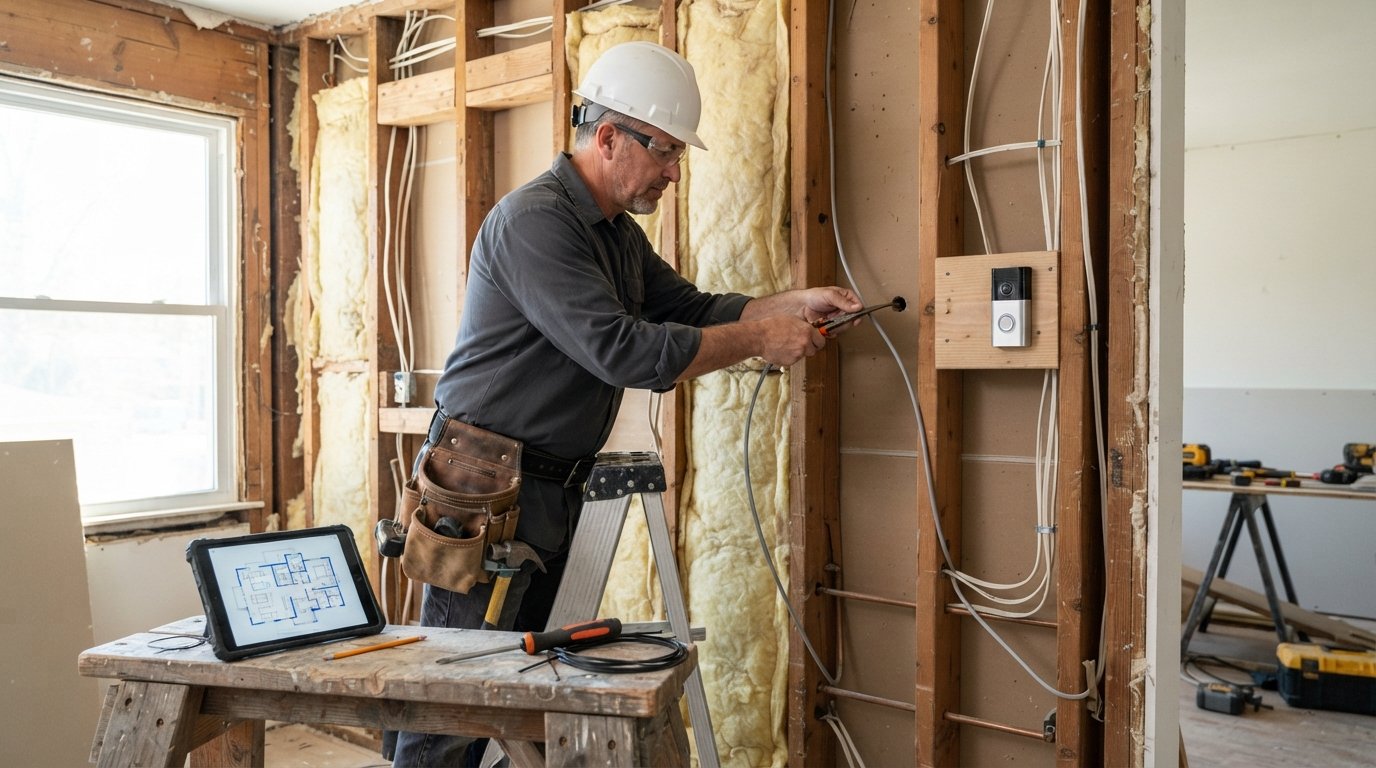
Renovation projects, by definition, expose the structural skeleton of a home. Walls are open, ceilings are accessible, and the electrical rough-in is already underway. This physical access is a finite resource. Once the drywall is hung and painted, every additional cable run becomes a demolition project. The cost differential is stark: running Ethernet and low-voltage power during the rough-in phase costs a fraction of what a retrofit costs after finishing.
Beyond cost, renovation offers a chance to design a security system holistically rather than piecemeal. Instead of buying a doorbell camera that works with one app, a lock that uses another, and a hub that struggles to bridge the two, you can specify a unified ecosystem. You can also future-proof. Conduit installed now can accommodate technology that does not yet exist, sparing you from tearing into walls again in five years when a new standard emerges.
There is also the matter of aesthetics. Surface-mounted wiring, wireless bridges, and visible power adapters clutter a newly renovated space. Hardwired devices, recessed sensors, and in-wall touch panels maintain the clean lines that homeowners pay a premium to achieve. Planning security during the renovation is the only way to get that seamless look without compromise.
Pre-Wiring and Conduit Planning for Cameras, Sensors, and Doorbells
The foundation of any robust smart home security system is its low-voltage wiring plan. This plan should be developed before the electrical rough-in is finalized, because it must coordinate with the placement of outlets, switches, and structural elements. The goal is to identify every location where a device will eventually live and ensure that power and data pathways reach that location unobtrusively.
Start with a scaled floor plan and mark the critical security zones. These typically include entry points, blind spots along the perimeter, high-value interior areas, and the garage. For each zone, decide whether the device will be wired for power, data, or both. Many modern cameras and doorbells can run on Power over Ethernet (PoE), which delivers both electricity and network connectivity through a single cable. PoE is the gold standard for renovation because it centralizes power management and eliminates the need for a nearby outlet.
Conduit is your insurance policy against obsolescence. Even if you plan to use wireless devices initially, running empty conduit from a central wiring closet to key device locations costs very little during rough-in and provides immense flexibility later. Use at least three-quarter-inch conduit for future cable pulls, and leave a pull string in each run. For doorbell locations, run both a PoE cable and a traditional doorbell transformer wire; this gives you the option of a smart doorbell or a traditional chime system.
Consider the following pre-wiring priorities for a typical renovation:
- Entry doors: PoE or low-voltage power for video doorbells, plus wiring for smart locks and door sensors.
- Perimeter corners and soffits: PoE runs for exterior cameras, positioned to cover approaches and blind spots.
- Interior hallways and stairwells: Power for motion sensors and keypads, with conduit for future sensors.
- Garage and basement: Wired sensors for doors and windows, plus a network drop for a garage controller or hub.
- Central wiring closet: A dedicated location for the network switch, PoE injectors, alarm panel, and backup power.
Document everything. Take photos of the open walls with the cables and conduit in place, and label each run at both ends. This documentation will save hours of confusion for the security installer and for any future electrician. A well-labeled low-voltage panel is a mark of professional workmanship and a selling point when you eventually list the home.
Coordinating Security Installers with Electricians and General Contractors
One of the most common failure points in renovation security projects is poor coordination among trades. The general contractor manages the schedule, the electrician runs line-voltage wiring, and the security installer handles low-voltage systems. If these three parties do not communicate, you end up with conflicts: a camera location blocked by a new light fixture, a sensor wire stapled too close to a power line, or a security panel installed in a closet that the electrician has already claimed for a subpanel.
The solution is to bring the security integrator into the project during the design phase, not after the drywall is up. Ideally, the security professional should review the architectural plans and provide a low-voltage plan that the general contractor can incorporate into the master schedule. This review should happen before the electrical rough-in begins, because the electrician needs to know where to leave space in the panel and where to avoid routing high-voltage lines that could cause interference.
Schedule a pre-construction walkthrough with all three parties present. Walk the site, mark device locations on the studs with painter's tape, and agree on cable pathways. This meeting prevents the classic scenario where the electrician finishes and the security installer arrives to find no clear path from the basement to the attic. It also clarifies who is responsible for drilling holes, pulling cable, and patching afterward.
Contractually, the scope of work should be explicit. Does the electrician provide the low-voltage rough-in, or does the security company? Who supplies the cable? Who terminates it? Who tests it? Ambiguity here leads to change orders and delays. If you are using a general contractor, ask them to include the low-voltage scope in their bid package and to hold the security subcontractor to the same schedule milestones as the other trades.
For homeowners who are managing the project themselves, this coordination burden falls on you. The good news is that platforms like Contractor.Homes can help you find vetted local professionals who are accustomed to working alongside other trades. When interviewing electricians and security installers, ask directly about their experience with renovation rough-ins and their willingness to coordinate schedules. A contractor who has never worked in an occupied renovation may underestimate the importance of timing.
Choosing Between DIY Kits and Professionally Installed Systems
The market offers two broad paths for smart home security: do-it-yourself (DIY) kits and professionally installed systems. Each has a place, and the right choice depends on your technical comfort, budget, and the complexity of the renovation. Understanding the trade-offs before you commit is essential, because switching paths mid-project is costly.
DIY kits from major retailers are appealing for their low upfront cost and ease of installation. They typically use wireless sensors, a hub, and smartphone control. For a small apartment or a rental unit, a DIY kit can be a perfectly reasonable solution. However, in a renovation context, DIY kits have significant limitations. Wireless sensors rely on batteries, which need replacement every year or two, and the wireless protocol may be vulnerable to jamming or interference in a home with many connected devices. More importantly, DIY kits rarely integrate well with the hardwired infrastructure you are installing during the renovation.
Professionally installed systems, by contrast, are designed to leverage the wired backbone. They offer centralized power, cellular backup, professional monitoring, and tighter integration with other home systems. The upfront cost is higher, but the reliability and longevity are superior. For a whole-home renovation, a professional system is usually the better investment because it can be designed to match the home's architecture and the homeowner's lifestyle.
A hybrid approach is increasingly popular: a professionally installed wired backbone for core security (door sensors, motion detectors, alarm panel) combined with DIY-friendly smart devices for cameras and doorbells. This approach gives you the reliability of a monitored alarm system with the flexibility of consumer-grade cameras. The key is to ensure that the wired backbone uses open standards or has an API that allows integration with the consumer devices you choose.
When evaluating professional installers, ask about their monitoring contracts, equipment ownership, and integration capabilities. Some companies lock you into long-term monitoring agreements and proprietary equipment that cannot be expanded without their involvement. Others offer flexible, app-based monitoring and equipment that you own outright. The latter is generally preferable for homeowners who plan to stay in the home and want to control their own security destiny.
Budgeting for security during a renovation is easier when you break it into phases. Use a smart home project budgeting tool to estimate the rough-in costs, equipment costs, and installation labor separately. This granularity helps you compare bids from different security providers and avoid surprise charges for cable, connectors, or patching.
Sequencing Installation to Avoid Rework
The sequence of installation during a renovation follows the natural order of construction: rough-in, then trim-out, then commissioning. Getting the sequence right is critical because each phase depends on the previous one being complete and inspected. Rushing the sequence leads to rework, damaged equipment, and missed deadlines.
The first phase is the low-voltage rough-in, which happens alongside the electrical rough-in. During this phase, all cables and conduit are run, secured, and labeled. Device boxes are installed at the correct heights and locations. This is the time to verify that every planned device location has power and data, and that the pathways are clear of obstructions. The rough-in should be inspected before the drywall is hung; take photos and test continuity on every cable.
The second phase is the trim-out, which happens after drywall, paint, and flooring are complete. During this phase, the security installer mounts devices, terminates cables, and connects them to the panel or network switch. Smart locks, doorbells, cameras, and sensors are physically installed. This phase requires coordination with the finish trades to avoid damaging newly installed surfaces.
The third phase is commissioning, which includes programming, testing, and training. Every sensor should be tested for function and range. Cameras should be adjusted for field of view and lighting. The alarm panel should be programmed with zones and user codes. Finally, the homeowner should receive a walkthrough of the system, including how to arm and disarm, how to use the app, and what to do if an alarm triggers.
To keep the sequence on track, create a simple checklist that maps each security task to the corresponding construction milestone. For example:
- Design phase: Finalize low-voltage plan, select equipment, and coordinate with the general contractor.
- Rough-in phase: Run cable and conduit, install device boxes, test continuity, and photograph all runs.
- Pre-drywall inspection: Verify cable placement, labeling, and protection before walls close.
- Trim-out phase: Mount devices, terminate connections, and verify power and data at each location.
- Commissioning phase: Program, test, document, and train the homeowner.
Following this sequence prevents the most common renovation regret: realizing after the drywall is up that a camera needs a cable you did not run. It also ensures that the security system is integrated into the home's network and power infrastructure from day one, rather than being bolted on as an afterthought.
Network and Power Considerations for a Reliable System
A smart home security system is only as reliable as the network and power infrastructure that supports it. During a renovation, you have a rare opportunity to design that infrastructure properly. Start with a dedicated network segment for security devices. Many routers support guest networks or VLANs that can isolate security traffic from general internet traffic, improving both security and performance. A hardwired network switch with PoE ports in the central wiring closet is the backbone of this design.
Power resilience is equally important. Security devices should be on a circuit that is backed by an uninterruptible power supply (UPS) or, ideally, a whole-home generator. At minimum, the alarm panel and network equipment should have battery backup that lasts several hours. This ensures that the system remains operational during a power outage, which is precisely when security is most needed.
Do not overlook heat and ventilation in the wiring closet. Networking equipment and PoE injectors generate heat, and a sealed closet can cause premature failure. Plan for passive ventilation or a small exhaust fan. Also, keep low-voltage cables separated from line-voltage cables by at least a few inches to reduce electromagnetic interference; this is especially important for analog sensors and older camera systems.
Finally, document the network design. Label every port, record IP addresses, and store the documentation in a secure location. A future homeowner or technician will thank you, and you will avoid the frustration of troubleshooting a system that no one understands.
Budgeting and Hiring for Integrated Security
Homeowners often underestimate the cost of security integration because they compare it to the price of a few retail cameras. A properly integrated system includes cabling, conduit, device boxes, labor, equipment, programming, and monitoring. The total can range from a few thousand dollars for a basic wired system to tens of thousands for a comprehensive whole-home installation with advanced analytics and integration.
To get accurate numbers, request itemized bids from at least three security integrators. Ask them to separate rough-in labor, equipment, trim-out labor, and monitoring fees. This transparency makes it easier to compare bids and to identify where one provider is cutting corners. It also helps you decide which parts of the project to bundle with the general contractor and which to contract directly.
When hiring, prioritize experience with renovation projects. An installer who is accustomed to new construction may not understand the constraints of an occupied home or the need to coordinate with other trades. Ask for references from recent renovation projects and follow up on them. A good installer will be willing to walk the site with your general contractor and to put their scope of work in writing.
The integration of smart home security during a renovation is an investment in both peace of mind and property value. By planning the low-voltage backbone early, coordinating trades carefully, and sequencing installation correctly, you can avoid the costly rework that plagues retrofit projects. The result is a home that is secure, efficient, and ready for the technology of the next decade.